


AI Hair Try On & Color Changer
4.736.00 Reviews
App Specs
- Version
- 1.0.12
- Updated On
- License
- Free
- Downloads
- 10,000+
- Developer
- Dream Prayer Developer
- Categories
- Beauty
- Platform
- Android
Screenshots
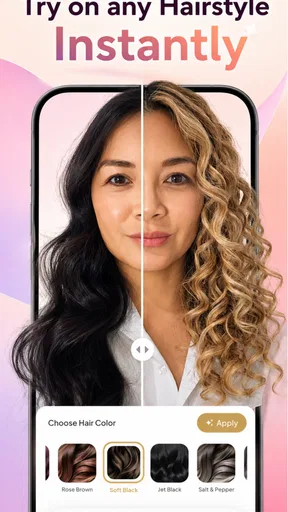
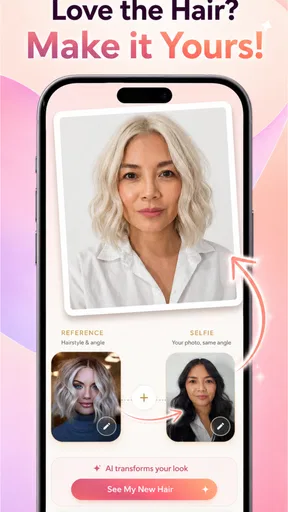
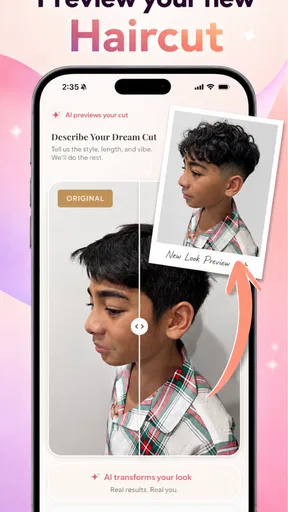
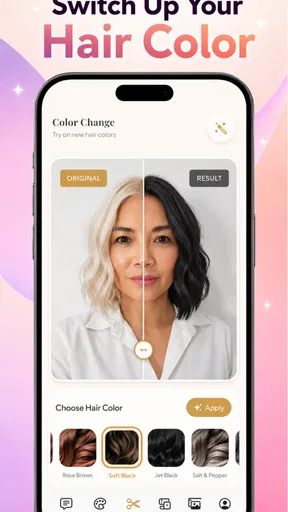
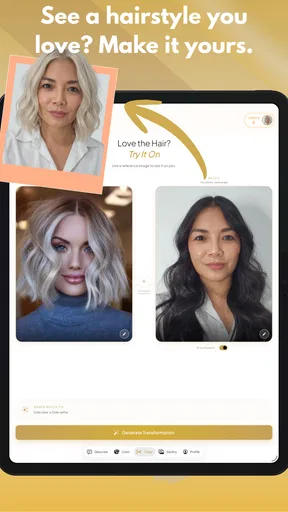
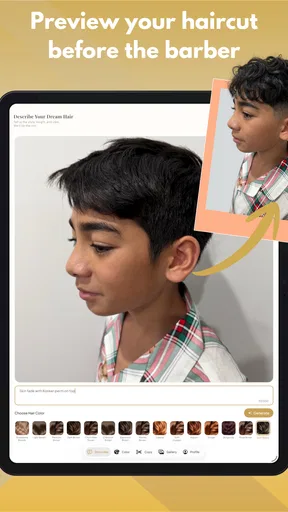
 Analysis by AppCompare
When I’m unsure about changing my hair, I want a way to compare a few directions before making an appointment—not a screen that pretends to know exactly what a stylist can create. AI Hair Try On & Color Changer is best approached as a visual planning aid: it lets you consider different looks on an image of yourself and sort out what appeals to you before committing to a real cut or colour.
That distinction shapes my whole view of the app. A preview can help turn “maybe I should change something” into a more useful idea, but it cannot account for every detail of your hair or how a salon result will behave. Used with realistic expectations, it can make early exploration more focused. Used as a promise of an exact outcome, it is likely to disappoint.
Exploring a new look at a sensible pace
I’d approach a new look by deciding what I want to learn before opening the app: whether a different length suits me, whether a warmer shade feels right, or whether I’m ready for a bigger change. Keeping that question in mind makes each comparison more useful and helps me avoid treating a striking preview as a promise of the salon result.
Start by narrowing the question
The most helpful result is not necessarily one perfect preview. It is learning which broad direction feels right: a warmer colour, a shorter outline, or a change that is more noticeable than you expected. That kind of comparison is useful when you are browsing inspiration but do not yet have clear words for what you want.
I’d start with a photo that shows your face clearly and gives the hair area room to be understood. A busy background, strong shadows, or hair blending into dark clothing can make a visual preview harder to judge. This is a practical consideration for any image-based styling tool, rather than a claim about a particular technical feature. Keep the source picture consistent while exploring options, so differences between previews are easier to attribute to the hairstyle rather than a new photo.
One useful workflow is to test a restrained change first, then compare it with a more adventurous choice. For colour, check a nearby shade before jumping to a dramatic contrast. For a cut, judge whether the overall silhouette appeals to you before fixating on fine details. This helps separate “I like this idea” from “I like this exact rendering,” which are not always the same thing.
What a good pace feels like
For this kind of app, perceived speed matters less as a headline and more as part of the decision process. If you are comparing several ideas, you want to stay focused on the choices rather than lose your train of thought between them. I would judge the experience by whether it lets you move through a small set of useful comparisons comfortably on your own device, rather than expecting every image to behave like an instant, perfectly polished salon photograph.
Worth Reading Before You Choose

Flipboard Shows What News Apps Must Do Beyond the Feed

Switching to Android Auto Means Rethinking Your Driving Routine

Google Calendar Makes a Crowded Week Easier to Manage

Ludo King Makes the Most of the Minutes Between Plans

Baby Panda World Brings Quick Play to Modern Phones, but Its Game Library Feels Busy

ESPN’s Live Game View Makes Following Close Games Easier
A realistic everyday use is checking options before an appointment. You could take a clear picture at home, explore a few lengths or shades, and keep a mental note of the two or three directions that feel promising. The aim is not to arrive at the salon with a supposedly exact digital blueprint. It is to arrive with a better sense of what you want to ask for—and what you definitely do not want.
If an image takes longer than you hoped or a preview looks awkward, I would avoid making a judgement from one attempt alone. Try a better-lit photo or a different angle if the app allows you to choose another image. A preview that struggles with one picture may say more about that picture than about the haircut idea itself. Equally, if repeated comparisons feel sluggish on your phone, this may not be the right tool for rapid-fire experimentation.
When more previews stop helping
It is tempting to test every available direction, but more previews do not automatically create a clearer decision. After a while, small changes can become difficult to compare, especially if you keep switching between photos or judging each option under different lighting. I recommend limiting a session to a few distinct ideas and returning to the strongest candidates later. A little distance can reveal whether you genuinely like a style or were simply reacting to novelty.
Heavy use is also where practical friction becomes more noticeable. If you are exploring numerous colours and cuts in one sitting, you will spend more time evaluating images and managing your own comparisons. That is a reason to keep a short shortlist, not an indication that the app has a particular resource problem. I would not assume how much battery, storage, or mobile data it uses without testing it on the specific device and connection you plan to use.
For a more thoughtful comparison, write down what you like about each candidate: the length, the shape around the face, or the level of colour contrast. This small step is surprisingly helpful because a picture can leave you with a vague impression rather than a practical request. It also gives you a way to discuss the idea with a stylist without expecting them to reproduce a digital effect pixel for pixel.
Make a useful comparison, not a beauty contest
One easy trap is choosing the preview that looks most flattering overall, even if the hairstyle itself is not the reason. To keep your judgement grounded, compare the same photo and ask one specific question at a time: does the shorter outline appeal, or is it the colour doing the work? This is especially helpful if you are considering a cut and colour together, since changing both at once can make it hard to tell which part you actually want.
If you are deciding with someone else, show them a small set of contrasting options rather than a long gallery. Ask what they notice about the shape or shade, then consider whether their reaction matches your own. The app can make a conversation more concrete, but another person’s preference should not become the decision; you are the one who will wear and maintain the result.
How much to trust a preview
I would treat consistency as an important part of judging any hair try-on app. A useful result should help you compare options, but it is still a visual approximation. Hair can be affected by curl pattern, density, existing colour, and the way it is styled. A screen preview cannot settle how a cut will sit after washing or how a colour will look under indoor and outdoor light, so it should not replace professional advice for a substantial change.
When a preview seems unconvincing, check the source image before rejecting the whole concept. Hair tucked behind one shoulder, a face turned sharply away, or uneven light may make comparisons less informative. Taking a straightforward photo for planning—rather than choosing an image purely because it looks flattering—can make it easier to focus on the hairstyle itself. If a candidate still looks wrong across reasonable images, that is useful feedback too: it may not be a style you want to pursue.
I also prefer to keep the app’s role modest. Use it to shortlist and communicate, then ask a hair professional about upkeep, suitability, and what the change involves in real life. That is especially important for a dramatic colour shift or a cut that depends on daily styling. A polished preview can be persuasive, but it cannot tell you whether you will enjoy maintaining the result.
Fit, access, and spending decisions
Dream Prayer Developer makes this beauty app, which is free to install and rated for Everyone. It requires Android 7.0 or later, so it is an option for Android users whose devices meet that requirement. Its current version is 1.0.12. The average rating is 4.7 from around 438 ratings, and it has 10K+ installs. I see those figures as signs of interest, not a guarantee that every person will get an equally convincing preview.
There are in-app purchases priced from $3.99 to $34.99 per item. I would explore the free experience first and decide whether the available comparisons already answer your question before spending anything. If you only want to test one or two broad ideas, a paid option may not be necessary for your purpose. If a purchase is presented during your own use, check exactly what it covers and whether it suits the way you plan to use the app rather than assuming every option is included.
This is a better fit for someone who wants visual inspiration than for someone seeking a precise technical consultation. It may also be a poor choice if you do not want to use a photo of yourself, if you expect a photo preview to predict an exact salon outcome, or if you need detailed advice about hair health and maintenance. In those cases, a stylist consultation or a reference-photo collection may be more useful. Compared with ordinary beauty inspiration browsing, the key difference is the chance to consider styles in relation to your own image; compared with professional consultation, it lacks the personal assessment that comes from an expert seeing your hair in person.
Where alternatives have the edge
A general inspiration feed is often better when you want to discover a wide range of real people, textures, and styling choices without starting from your own photo. A stylist is the better choice when the decision depends on your hair’s condition, the work needed to reach a colour, or how much upkeep you can realistically manage. This app sits between those options: it helps you imagine a direction on your own image, but it cannot offer the breadth of real-world examples or the tailored judgement of a consultation.
That middle ground is useful if you already have a rough idea and need help expressing it. It is less useful if you are starting from a technical question such as whether your current hair can safely reach a particular shade. In that situation, a preview might help you describe your goal, but the next step should be a conversation with a professional rather than more screen comparisons.
A measured verdict for planning a change
AI Hair Try On & Color Changer earns its place as a low-commitment starting point for people who are curious about a new look but not ready to act. I like the way this kind of comparison can turn a vague thought into a more focused conversation. Its strongest use is narrowing down preferences, not forecasting a finished hairstyle with certainty.
My practical advice is to choose one clear photo, test a handful of meaningfully different looks, and keep the options that still appeal after you step away from the screen. For a small refresh, that may be all the inspiration you need. For a major cut or colour transformation, take the preview to a professional and discuss what is realistic for your hair. As a planning tool, it is most convincing when you use it to ask better questions rather than expect it to make the decision for you.
The app was released on February 8, 2026, and its current version is 1.0.12. Those details place it as a relatively recent option in a familiar beauty-app category, but the deciding factor for me is simpler: whether the previews help you clarify your taste without being mistaken for a guarantee. If that is what you want, it is worth trying; if you need expert judgement or a dependable prediction of the final salon result, choose a person rather than a screen.
Pros
- Preview different hair colors and styles before making a real-world change.
- Useful for comparing several looks in one place.
- Can help you communicate a hairstyle idea to your stylist.
- A low-commitment way to explore bold colors and cuts.
- Convenient for experimenting without visiting a salon.
Cons
- AI previews may not accurately reflect how a style suits your face.
- Results can vary with photo lighting
- angle
- and image quality.
- Some styles or colors may require a paid upgrade.
- The app may request access to your photos or camera.
- A digital preview cannot show how a hairstyle moves or feels.
FAQs for AI Hair Try On & Color Changer
What does AI Hair Try On & Color Changer do?
AI Hair Try On & Color Changer lets you preview possible hairstyles and hair colors on a photo before deciding whether to change your look. Depending on the app’s available options, you may be able to explore different cuts, lengths, styles, or shades. Results are visual previews rather than a guarantee of how a hairstyle or dye will look in real life.
How do I get the most realistic hairstyle preview?
Use a clear, well-lit photo taken from the front, with your face and hairline visible and your hair away from your face if possible. A simple background can also help the app detect your features. Results may vary with image quality, lighting, pose, and hair texture, so try another photo or adjust the hairstyle placement if the preview does not align naturally.
Is AI Hair Try On & Color Changer free to use?
The app may offer some features at no charge while reserving additional hairstyles, colors, or tools for a subscription or in-app purchase. Pricing, trial periods, and available features can change, so check the app’s store listing and purchase screen before confirming anything. If you start a trial, review its renewal terms and cancellation steps to avoid an unexpected charge.
Does the app upload or store my photos?
Photo handling depends on the app’s current privacy practices and how its image-processing features work. Before uploading a personal picture, read the privacy policy and check what information may be collected, whether images are processed on your device or online, and how long they may be retained. Avoid using photos of other people unless you have their permission.
Can I use the preview to choose a real haircut or hair dye?
The preview can help you compare ideas and communicate your preferences, but it should not be treated as a precise prediction or professional recommendation. Screen colors may differ from real dye, and the result of a cut or color depends on your starting hair, texture, condition, and styling. Show a saved preview to a qualified stylist and discuss what is achievable for your hair.


